Transforming Egnyte into a complete document lifecycle platform: sign, compare, convert, and collaborate without leaving the platform.
Transforming Egnyte into a complete document lifecycle platform: sign, compare, convert, and collaborate without leaving the platform.
Transforming Egnyte into a complete document lifecycle platform: sign, compare, convert, and collaborate without leaving the platform.
Released
As Product Designer, worked on WebUI app.
As Product Designer, worked on WebUI app.
As Product Designer, worked on WebUI app.
Tools used:
Tools used:
Businesses needed more than file storage.
Businesses needed more than file storage.
Businesses needed more than file storage.
Users emailed files to third-party tools, breaking the audit trail and creating version confusion for signature workflows.
Comparing document versions required downloading both, opening external software, and manually tracking changes.
Converting between formats (PDF ↔ Docx) forced users to leave Egnyte. We had to increase stickiness on Egnyte.
Users emailed files to third-party tools, breaking the audit trail and creating version confusion for signature workflows.
Comparing document versions required downloading both, opening external software, and manually tracking changes.
Converting between formats (PDF ↔ Docx) forced users to leave Egnyte. We had to increase stickiness on Egnyte.
Users emailed files to third-party tools, breaking the audit trail and creating version confusion for signature workflows.
Comparing document versions required downloading both, opening external software, and manually tracking changes.
Converting between formats (PDF ↔ Docx) forced users to leave Egnyte. We had to increase stickiness on Egnyte.
Research & Exploration
Research & Exploration
Research & Exploration
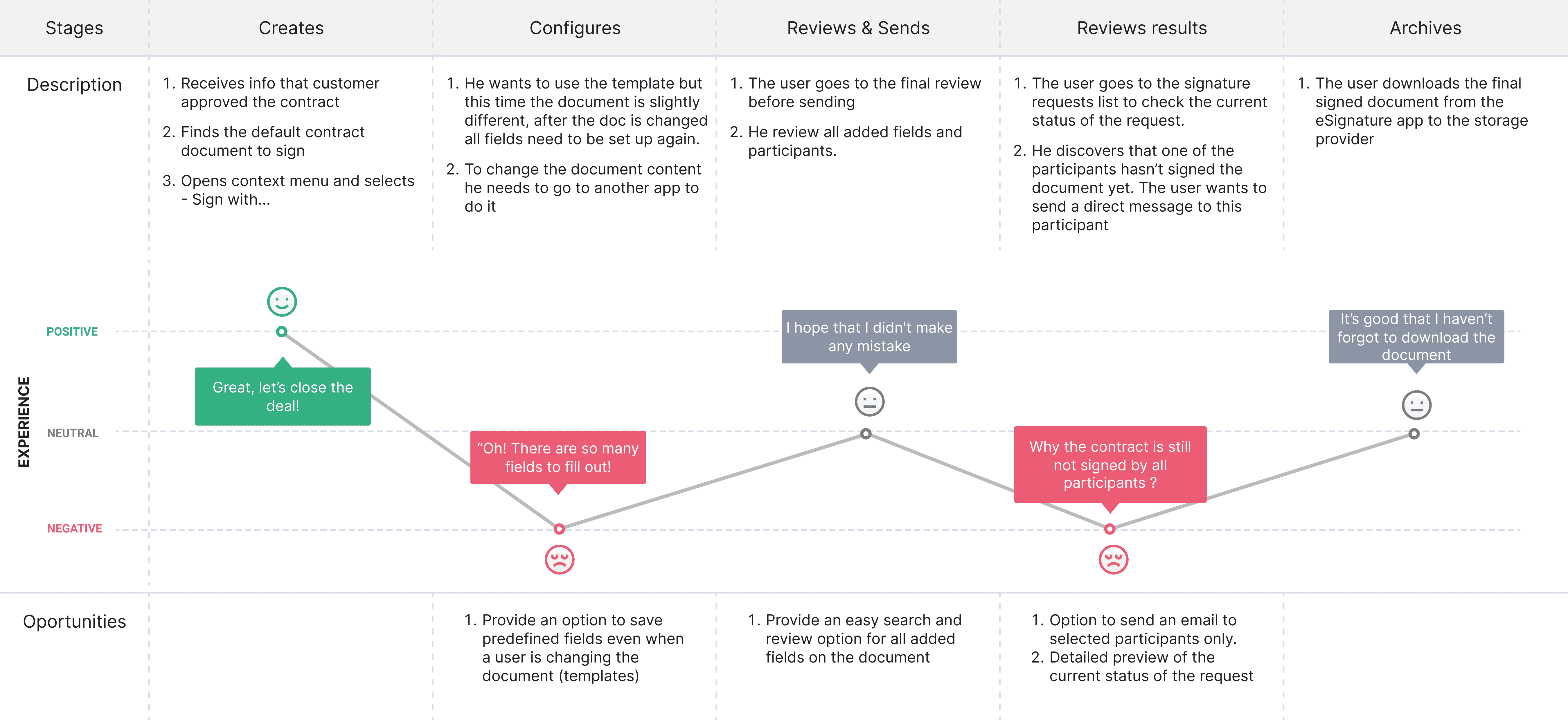
Since document workflows spanned multiple use cases (signing, comparison, conversion, and collaboration), the research phase involved studying competitors specific to each workflow rather than a single platform category. We mapped customer document journeys to understand where users left Egnyte, relied on external tools, or lost context between tasks.
Concepts and interaction flows were iteratively refined through usability testing to ensure these workflows felt connected, predictable, and native to the platform rather than separate feature additions.
If you'd like to discuss the product thinking, research, or design decisions behind this project, let’s connect.
Since document workflows spanned multiple use cases (signing, comparison, conversion, and collaboration), the research phase involved studying competitors specific to each workflow rather than a single platform category. We mapped customer document journeys to understand where users left Egnyte, relied on external tools, or lost context between tasks.
Concepts and interaction flows were iteratively refined through usability testing to ensure these workflows felt connected, predictable, and native to the platform rather than separate feature additions.
If you'd like to discuss the product thinking, research, or design decisions behind this project, let’s connect.
Since document workflows spanned multiple use cases (signing, comparison, conversion, and collaboration), the research phase involved studying competitors specific to each workflow rather than a single platform category. We mapped customer document journeys to understand where users left Egnyte, relied on external tools, or lost context between tasks.
Concepts and interaction flows were iteratively refined through usability testing to ensure these workflows felt connected, predictable, and native to the platform rather than separate feature additions.
If you'd like to discuss the product thinking, research, or design decisions behind this project, let’s connect.
Testing Session 3: Useberry App Results
Testing Session 3: Useberry App Results
Users were given a clickable prototype with instructions
Users were given a clickable prototype with instructions
Task 2: Send for signature using Egnyte Sign
Task 2: Send for signature using Egnyte Sign
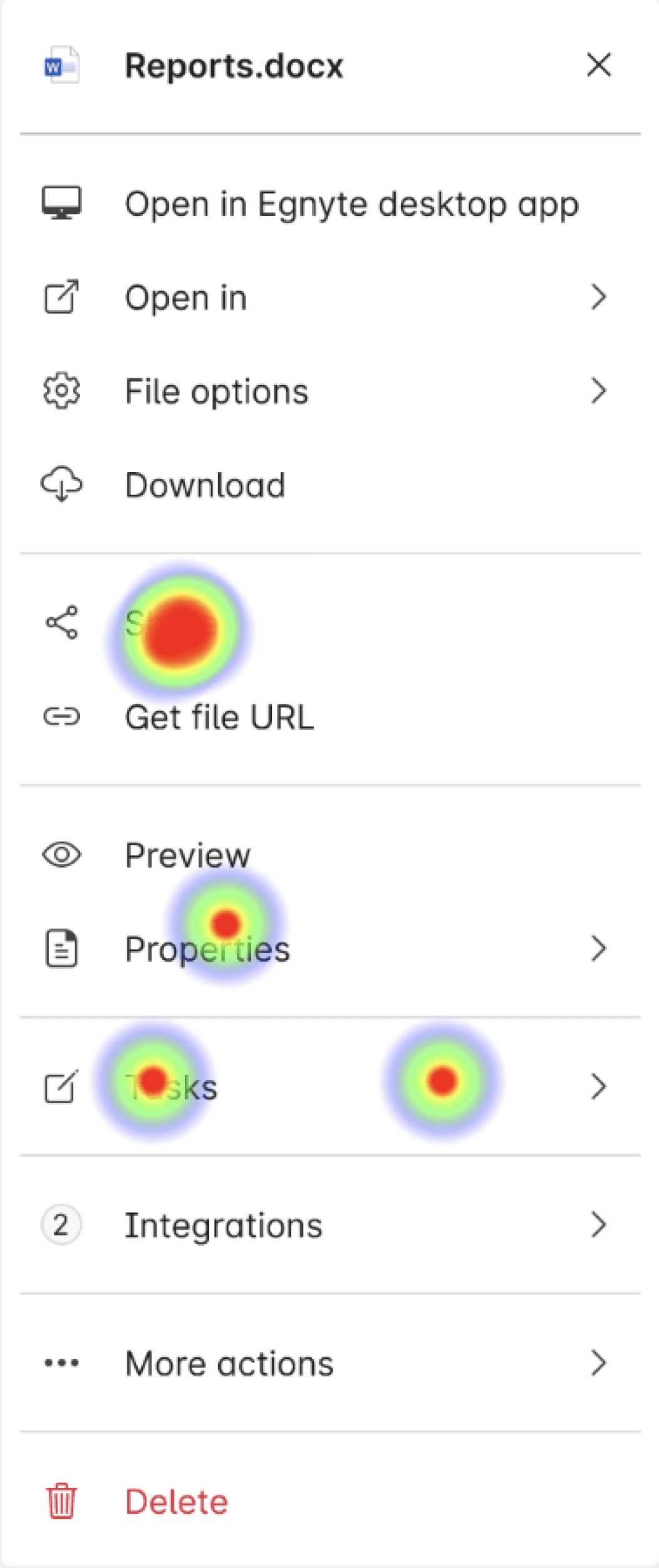
The data below shows the time and clicks users took to select ‘Send for signature’ from the context menu.
The data below shows the time and clicks users took to select ‘Send for signature’ from the context menu.
Users’ first click
Users’ first click
They looked under 'Share' since that's its current placement
They looked under 'Share' since that's its current placement
Users
Users
Nadar Samadi
Nadar Samadi
Richa Khalap
Richa Khalap
Sayali Godbole
Sayali Godbole
Jenny Ou
Jenny Ou
No. of clicks
No. of clicks
4 clicks
4 clicks
4
4
7
7
4
4
5
5
Total time taken
Total time taken
10.5 sec
10.5 sec
1 min 14.1 sec
1 min 14.1 sec
6.4 sec
6.4 sec
15.9 sec
15.9 sec
Key Design Decisions
Key Design Decisions
Key Design Decisions
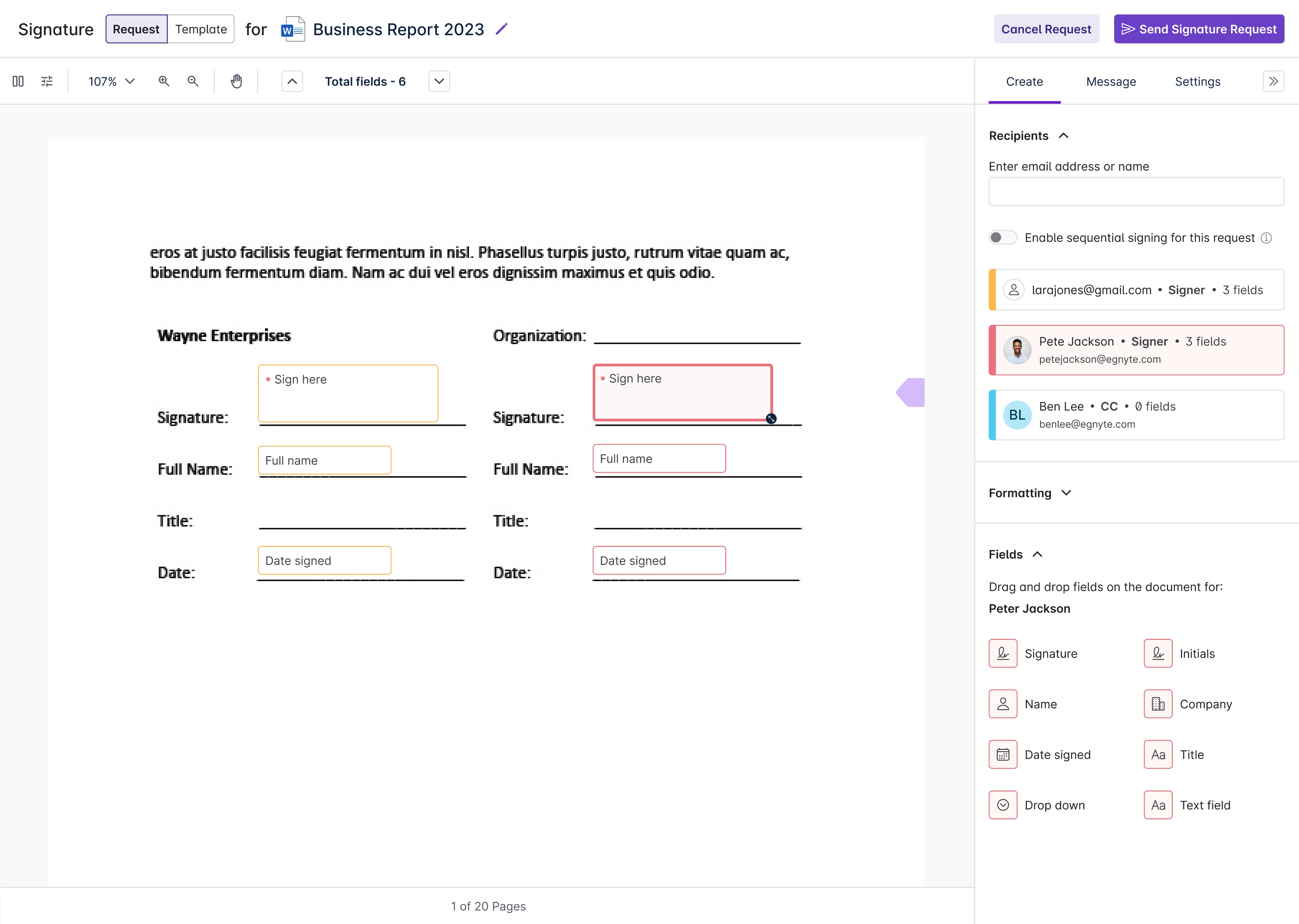
1 | Role-based recipients (Signer, CC) ensures accountability.
1 | Role-based recipients (Signer, CC) ensures accountability.
1 | Role-based recipients (Signer, CC) ensures accountability.
Problem: Undifferentiated recipient lists led to wrong people being set as signers, or signers missing the signing order entirely.
Problem: Undifferentiated recipient lists led to wrong people being set as signers, or signers missing the signing order entirely.
Decision: Distinct Signer and CC roles with visual differentiation. Signers get action prompts, CC recipients are clearly marked as observers only.
Decision: Distinct Signer and CC roles with visual differentiation. Signers get action prompts, CC recipients are clearly marked as observers only.
Why: Reduces manual process of sending signed documents after the signature workflow.
Why: Reduces manual process of sending signed documents after the signature workflow.
2 | Two modes: side-by-side text and visual overlay, for two different needs.
2 | Two modes: side-by-side text and visual overlay, for two different needs.
2 | Two modes: side-by-side text and visual overlay, for two different needs.
Problem: Legal and architecture documents have different needs for comparing.
Problem: Legal and architecture documents have different needs for comparing.
Decision: Users can switch based on what they're looking for. Text comparison for content changes and visual overlay for layout and formatting differences.
Decision: Users can switch based on what they're looking for. Text comparison for content changes and visual overlay for layout and formatting differences.
Why: To serve each use case properly without compromise.
Why: To serve each use case properly without compromise.
3 | Rename and choose save location before converting, not after.
3 | Rename and choose save location before converting, not after.
3 | Rename and choose save location before converting, not after.
Problem: Auto-saving converted files created clutter, overwrites, and compliance headaches.
Problem: Auto-saving converted files created clutter, overwrites, and compliance headaches.
Decision: A confirmation step lets users name the output and choose the destination folder before conversion runs.
Decision: A confirmation step lets users name the output and choose the destination folder before conversion runs.
The real design challenge was making all these features feel like they belonged together.
The real design challenge was making all these features feel like they belonged together.
The real design challenge was making all these features feel like they belonged together.
© 2026 All Rights Reserved | Parmi Mehta
© 2026 All Rights Reserved | Parmi Mehta